RStudio Panes
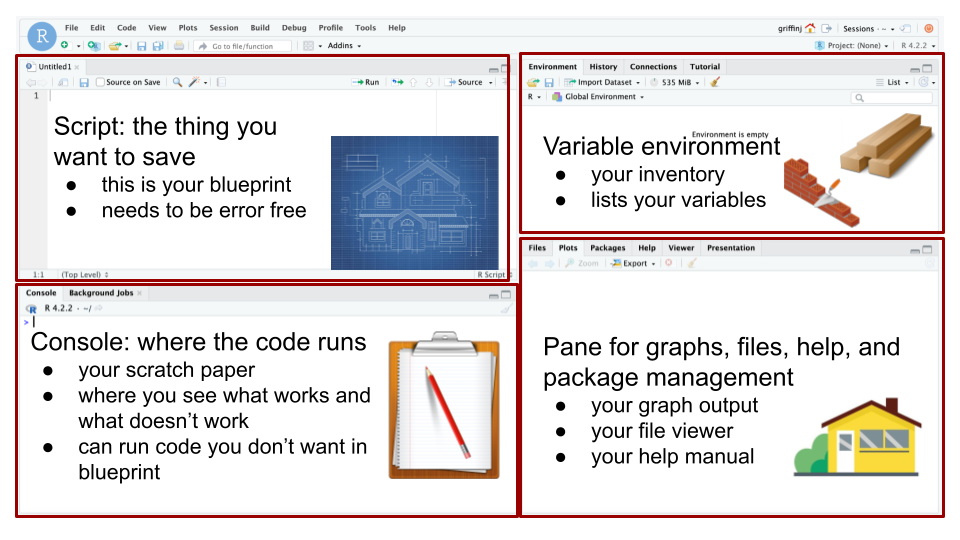
Typically when using RStudio you will see four panes. Using a metaphor of building a house instead for creating a graph, here is what each pane does:
The Script (top left): This is the main window you work in. Type your code here. This is the only code that will save. You want this script to be something that you can press a button and run, so make sure it doesn’t contain errors or extraneous code. It is like the blueprint for a house. It is something that you should be able to pass off to another person and they can understand and use it. (Comments help with this, more on that later.)
The Console (bottom left): This is like your scratch paper. You can type code here, but it will not save. This area shows you error messages in red or displays your code in blue if it ran successfully.
The Variable Environment (top right): This is like your inventory. Any variables that you create will show up here with a preview of what is inside them. So, if you load in a spreadsheet, you will be able to see its name and how many rows and columns it is here. The small broom icon is useful for clearing out all variables between projects.
The Bottom Right: This window has many functions, but chief among them is displaying your finished product, so your metaphorical house or your literal graph. It also is where you can view what files and packages you are working with (more on those later). It’s other great feature is the Help tab where you can see documentation for any R command. You can search for them or a good trick is to type
?[command]into the console, for example?sumwill explain what thesumfunction does.
Little Things:
- For three of the panes, if you want to delete what is currently there, press the little broom icon on that pane.
- You can click through the graphs you’ve made using the arrow keys in the bottom right pane.
- You can press the Zoom button to pop the graph into a new window.
- The view of files in the file browser is the same as that in Finder (Mac) or File Explorer (Windows).
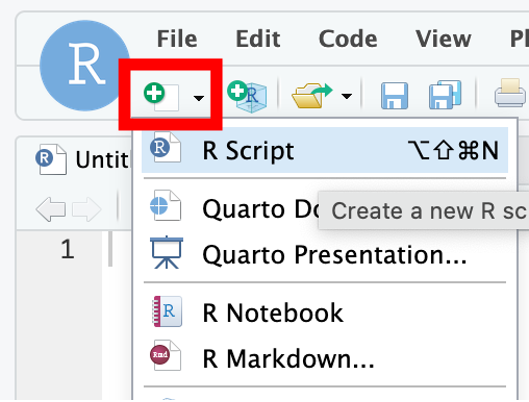
When you first open a project you will only see three of the four panes. This is because you have yet to open a script file. To do that you click the little green + in the upper left, or go to File > New File > R Script.