Piping
A pipe in R is an operator that allows you to pass the output of one function directly into the next function without needing intermediate variables. Let’s say we wanted to subset our data, then create a new column, then take the mean of this column. One way of doing this would be to create new variables for each step. Something like this (with words since we haven’t learned many functions):
subset <- portion of original
new_col <- make new column in subset
mean <- take mean of new_col
With a pipe we don’t have to create new variables, we can take the output of the first line and pass it directly to a new function. When we do this we say we are “piping”. The symbol for piping used to be %>% but has been updated to be |>. Depending on whose code you’re looking at, you could see either kind. In this workshop series, we will use |>, but both work the exact same way.
Here’s an example of the pipe operator in action. We’ll use a few new commands along the way, which we’ll discuss in more detail in the following pages.
First, this code creates a dataset called “data” that has a list of fruits, how many there are, and their cost.
Now let’s say we want to find out the total amount of money we are going to spend on peaches. Here’s our workflow using the pipe operator. (We’ll learn three of these functions today and summarize() next time.)
If you want you can run portions of the code above to see what each part of our pipeline does. For example, highlight from data through filter and run to see the output. *Note: if you’re just running a portion of the code, don’t include the end pipe, meaning highlight the code as pictured and run it:
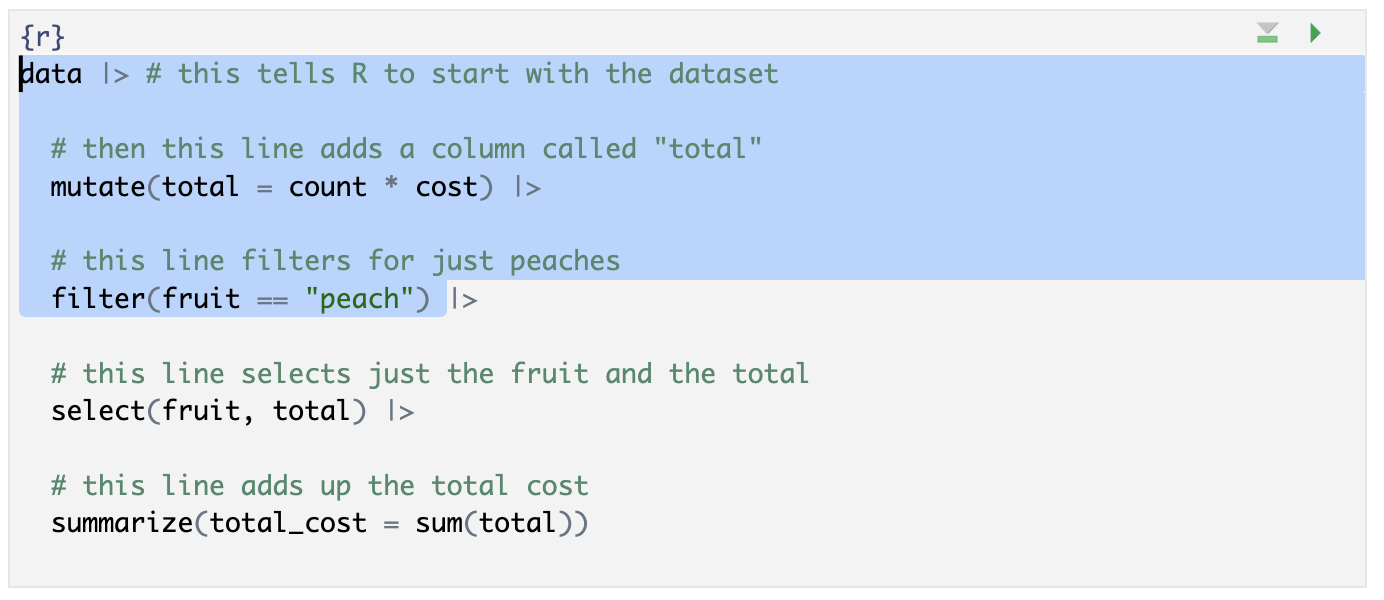
You should see just the two rows for “peach” and three columns, including the new “total” column.
The pipe operator works for stringing together additional functions the same way that the + in ggplot works for stacking on additional modifications. The |> should always be the last thing on the line and any new functions should start on the next line. Notice that you can pass a whole dataset to the pipe, as in the first line of code here where we say data |>. You should think of the pipe like saying “and” in a conversation; you add it to each command but you don’t want to say “and” to end a sentence, so the last line of code should not have a dangling pipe at the end or you will get an error. Meaning don’t try to run code like this:
data |>
select(column) |>
# the above line has a dangling pipe at the end
We will use pipes extensively in the rest of the workshop series, so here is more on piping, if you’re seeking additional info.